What's New in PreonDock 1.1?

Since the 1.0 release, we have been busy making your everyday workflow faster and smoother, are excited to announce the next stage. Version 1.1 is a focused update built around the things you do most: launching simulations, finding your data, and understanding your results. 

Here is what stands out. 

Share:
Launch Many Simulations at Once

Submitting batch simulations at once.

Running a parameter study no longer means submitting variants one by one. Select multiple variants, send them as a single batch to the same scheduler, and arrange the order in which they get picked up. Set up your study, hit submit, and let your cluster work through the queue.

Faster, More Flexible Job Submission

Prefilling the job submission form with settings from the most recent run.

Getting a job onto the cluster takes fewer clicks and adapts to more setups. 

  • Prefill the submission form from your most recent run on a project, so repeat submissions take seconds. 
  • Configure and choose between multiple schedulers and run the same scene on different schedulers depending on your setup. 
  • Richer start-script templates that automatically include project, scene, run, and submitter information. 

Find Your Data Faster

Narrowing down on a scene using nested search with the new advanced search options.

Search has been reworked from the ground up. A quick text search handles the everyday case, and a dedicated advanced search page and sidebar are there when you need to dig deeper. 

  • Narrow a scene search down to a specific subset of projects with nested search. 
  • See your active filters as clear, removable chips. 
  • Jump back to your most recent searches in a single click. 

Clearer Results and Insights

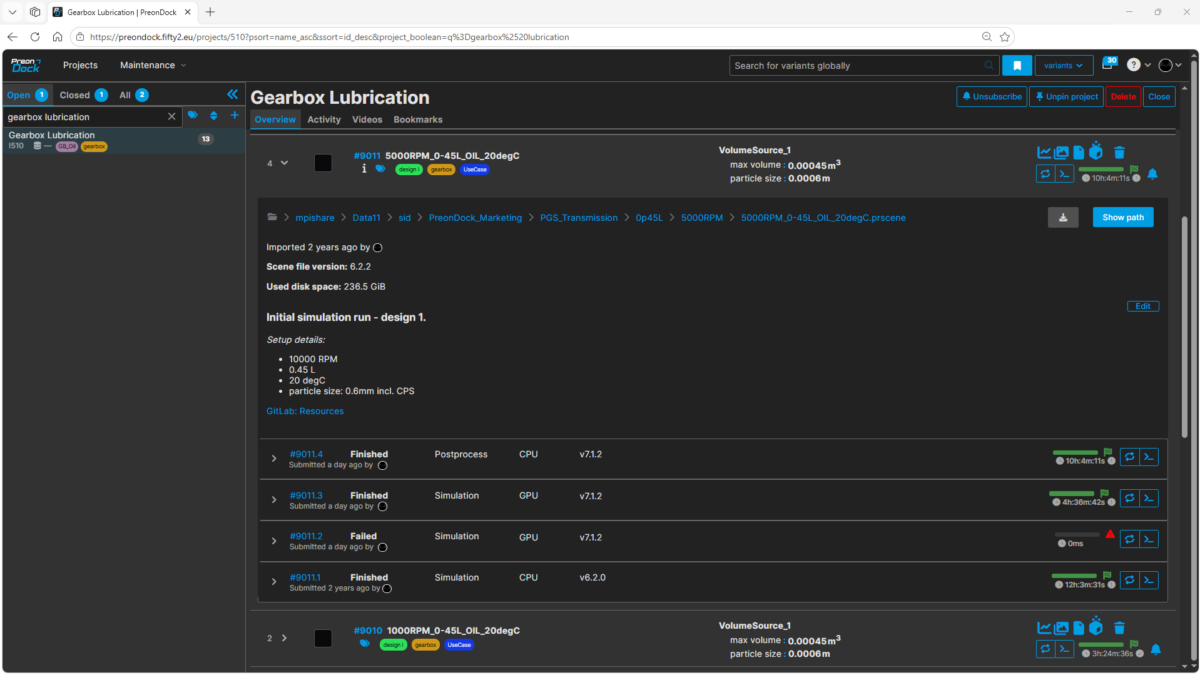
Overview showing advanced details of all the runs of a simulation variant.

Understanding what a run actually did is now easier at a glance. 

  • The run table shows whether a run was a simulation or a postprocess, whether it used CPU or GPU, and which PreonNode version produced it. 
  • The viewer timeline now works in real-time values, and you can jump straight to any timestamp. 
  • Statistics views are shareable and bookmarkable through the URL, ranges and smoothing included, and they load noticeably faster. 

Stay in the Loop

Subscribing to another user’s simulation notifications to stay updated about its progress.

You no longer need to be the person who launched a simulation to follow it. Anyone with at least observer-level access to a project can now subscribe to a variant‘s notifications and stay informed about its progress.

Plus, a smoother, more reliable experience

Alongside these features, 1.1 brings a long list of refinements across the interface and improved Slurm reliability, including correct handling of cancelled and multi-node jobs.

Get Started & Stay Connected

Ready to see PreonDock 1.1 in action?

Reach out and request a demo via sales@fifty2.eu or +49 761 45 89 23 – 83.
Check our webpage for videos and feature updates: PreonDock.
Subscribe to our newsletter and follow us on LinkedIn for news and best practices. 

Streamline workflow, accelerate engineering! 

RELATED ARTICLES

LEARN MORE ABOUT FIFTY2 News

How to get started with
Preonlab CFD software?
Get in Touch